Your whole shop, running in one place.
Multistores is the software a shop runs on. Customers buy from a website that carries your name. Staff sell at a counter that prints a receipt. And one back office behind both keeps the stock, the prices, the staff and the profit straight — without anybody typing the same number twice.
or call 0309 6313133
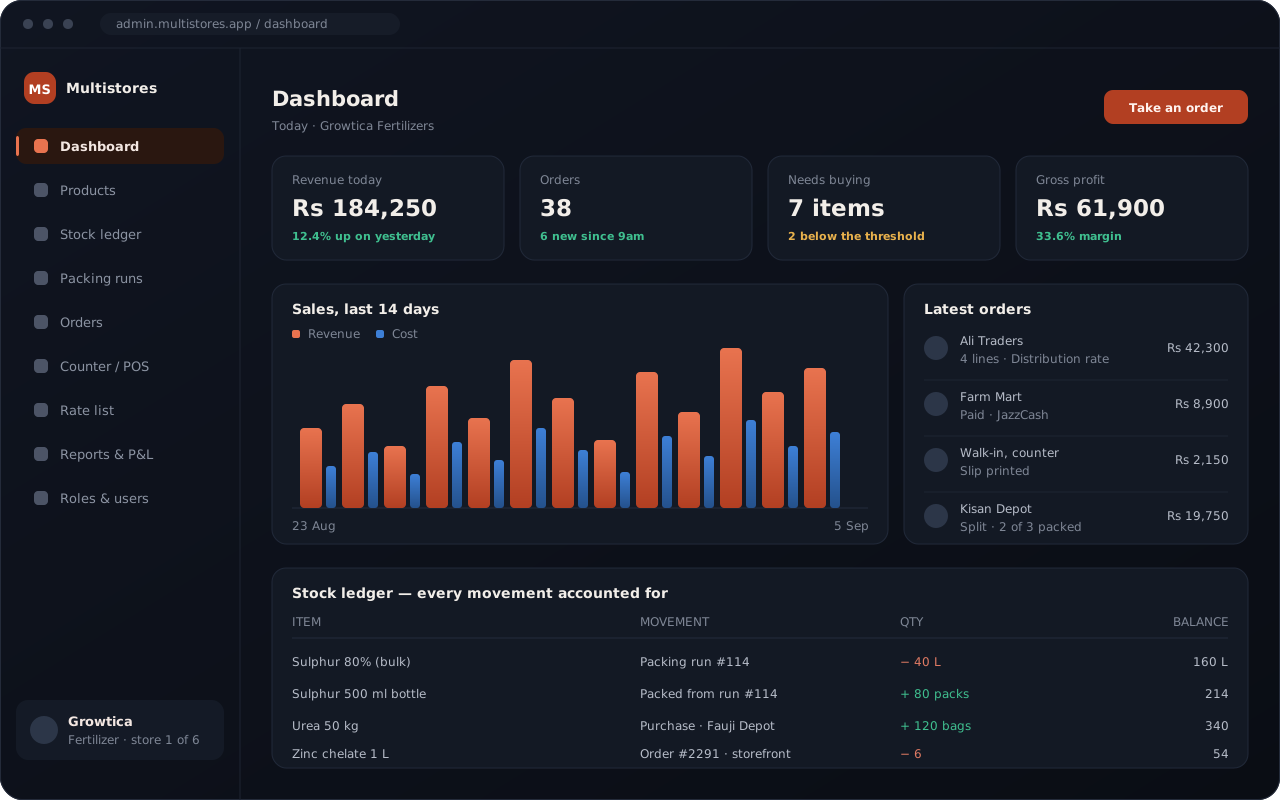
The back office — the private screen you and your staff work on.
login, however many businesses you own
ways an order reaches you — website, counter, or your own staff
trades it already knows, each with its own kind of product
things a staff member can be allowed, or not allowed, to do
Three ways to sell. One set of numbers.
If you have never used shop software before, this is the whole idea. An order can reach you three ways. Whichever way it arrives it lands in the same place — so the stock comes down once, the money is counted once, and there is nothing left to add up at the end of the day.
Your website
Customers browse and pay on a site with your name, your logo and your web address on it. It is open when you are asleep.
A farmer orders two bags at midnight.
Your counter
Staff ring a walk-in up on a touch screen and hand over a printed receipt, the same way they always have.
A table of four pays after dinner.
Your own staff
Somebody in your office puts the order in for a customer who rang up or sent a message.
A dealer sends a list on WhatsApp.
One back office underneath
Wherever the order came from, the same four things happen once and only once: the stock comes down by what was sold, the buyer is charged the price that belongs to them, the sale joins the day’s takings, and the profit on your dashboard moves. Nobody copies a figure from one book into another, because there is only one book.
Own a second business? It gets its own website, its own staff and its own books, sealed off from the first — and you move between them from the same login.
Words we will use
Storefront — your public website, the one customers see
Admin — the private back office only you and your staff can open
Counter, or POS — the till screen in the shop itself
Ledger — the list of every stock movement, so any figure can be explained
Four trades it already knows
When you create a store you pick your trade, and that changes what a product even is: drums and pack sizes for fertilizer, recipes for a kitchen, sizes and colours for cloth. Everything else — stock, prices, staff, money — works the same way in all of them, so somebody running two different trades runs them the same way.
Fertilizer & agri-chem
Buy in drums, sell in packs. Five prices worked out from one purchase cost, and a rate list you can print on your letterhead.
- Bottling a drum is a recorded job, not a guess
- Load the rate sheet you already keep in Excel
- Dealer and farmer prices side by side
Restaurants & cafés
A touch counter, printed receipts, and recipes that both price the dish and take the ingredients out of the store room.
- Dine-in, takeaway and table numbers
- Sell a plate, and the chicken leaves the store room
- Receipts over Bluetooth or from the till PC
Cloth & fashion
Sizes, colours, photo galleries, and a website that looks like your brand rather than a template somebody else also uses.
- Product galleries and collections
- Redesign the homepage banner for a new season
- Barcodes and shelf labels
Pharmacy & medicine
Tight stock discipline, supplier purchases kept batch by batch, and a counter that keeps a record of every single sale.
- Purchases recorded batch by batch
- A warning before the shelf empties
- A cancelled sale is marked, never wiped
Running something else? The parts underneath — stock, prices, orders, staff, money — do not care what you sell.
One system. As many businesses as you have.
Every business you add gets its own website, its own catalogue, its own staff and its own books. They sit side by side and never see each other — and that separation is checked on every single request, not left to a setting somebody could switch off by accident.
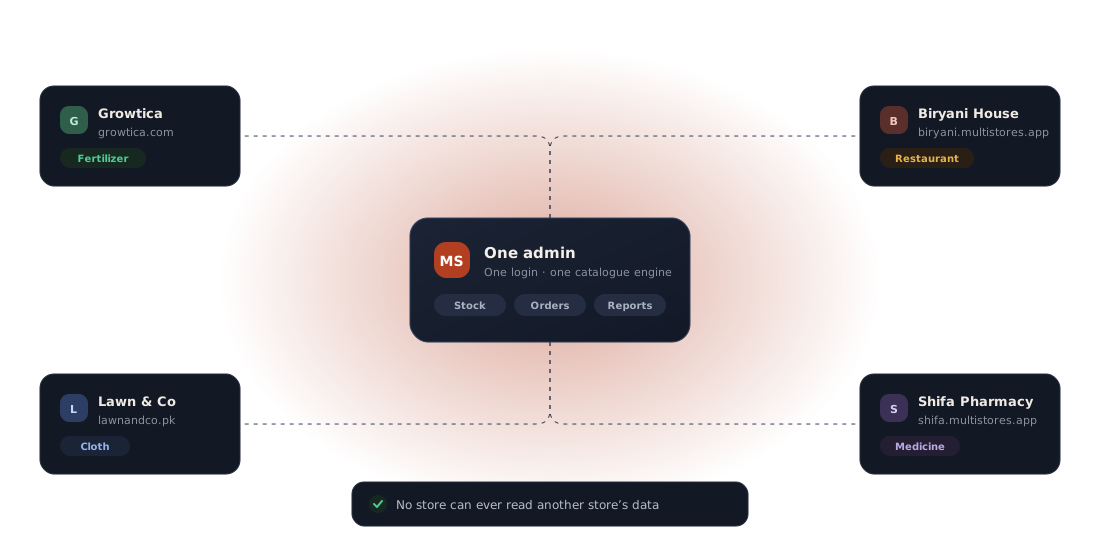
A website that looks like yours
Your logo, your colours, your homepage banner, your web address. Customers never see a platform — they see your shop.
A back office that holds the lot
Products, stock, purchases, orders, staff, prices and profit. Switch between your businesses from the same login.
A counter that prints
Take an order at the till, charge it, print the receipt, and watch the store room fall by exactly what was sold.
Everything a shop actually does, in one place
Not a catalogue with a checkout bolted on. The parts that usually live in a notebook — bulk stock, bottling, who gets which price, expenses, who is allowed to do what — are first-class here.
Selling online
- A branded website for every business
- Your own web address, or a free one on ours
- Design the homepage banner — layouts, tints, rotating slides
- Categories, subcategories and product photo galleries
- Pack sizes: sell the same product in 250 ml, 500 ml and 1 L
- Basket, checkout, and ordering without making an account
- Stripe, JazzCash, WhatsApp confirmation, cash on delivery
- An “ask for a price” button that opens a filled-in WhatsApp message
- Take orders for things you have not got yet, if you want to
Stock and buying
- Every in and out written down, so a balance can be explained
- Bulk stock kept apart from the packs you sell
- Bottling a drum records both sides of the job at once
- Sell what the bulk can still fill, before it has been bottled
- Recipes draw their ingredients out of the store room
- A shortage list every morning, worst first
- Purchases, suppliers and expenses in one book
- Barcodes made for you, and label sheets you can print
- Load products and price lists straight from Excel
At the counter
- A touch screen for dine-in, takeaway and walk-ins
- Receipts over Bluetooth, or by cable from the till PC
- Staff can place an order on a customer’s behalf
- Send part of an order out now and the rest when stock lands
- A cancelled sale is marked with a reason, never wiped
- Kitchen holds, table numbers, and who served whom
Money and people
- Takings, cost and profit, by day or by period
- Profit and loss, with your expenses folded in
- A price list you can print or export on your letterhead
- A price band per customer — dealer, direct, farmer, retail
- Wages, and commission for staff who sell
- Give each job only the buttons it needs, person by person
- Owners of several businesses switch between them from one login
Own web address
growtica.com, or growtica on our address — free with every store.
Shelf labels
Make a barcode, then print forty labels onto one A4 sticker sheet.
Excel import
See every row before it lands. One bad line does not sink the sheet.
Sealed per shop
Staff are tied to their own business and cannot look sideways.
Where shops quietly lose money
Stock figures that stop being true, buyers charged the wrong price, a counter that does not talk to the books, and staff who can see more than they should. Each one has an answer here.
Numbers that add up, because nothing is typed twice
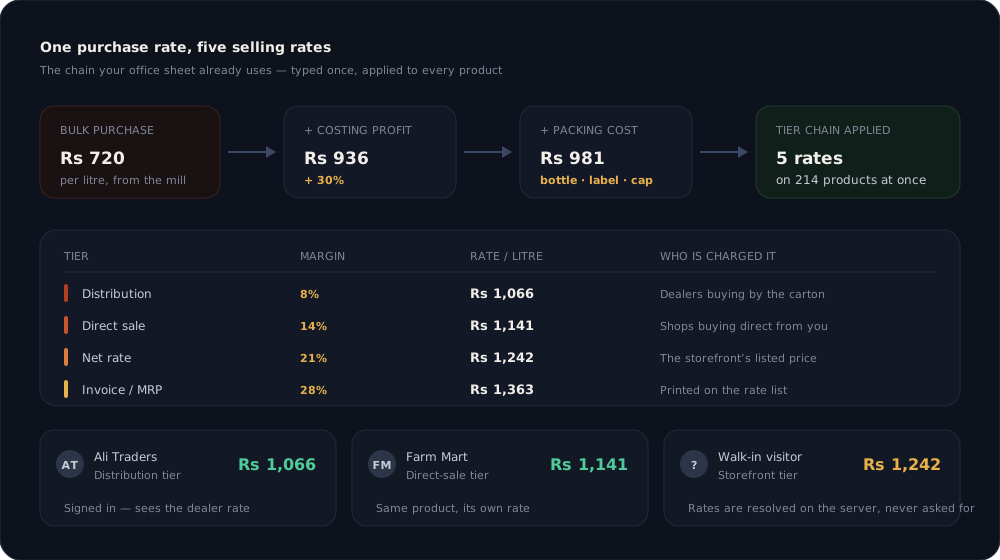
A balance is not a box somebody edits. Every movement — a delivery, a sale, a bottling job, a correction — writes a line, and the balance is what those lines come to. When a figure looks wrong you can read back why, instead of guessing.
- A 200 litre drum becomes 40 quarter-litres, 80 half-litres and 18 one-litre packs in one recorded job
- Spillage is written down as waste, so you can see afterwards what a job really yielded
- Nothing bottled yet? The website still sells what the bulk can fill
- Two tills racing for the last carton cannot both win it
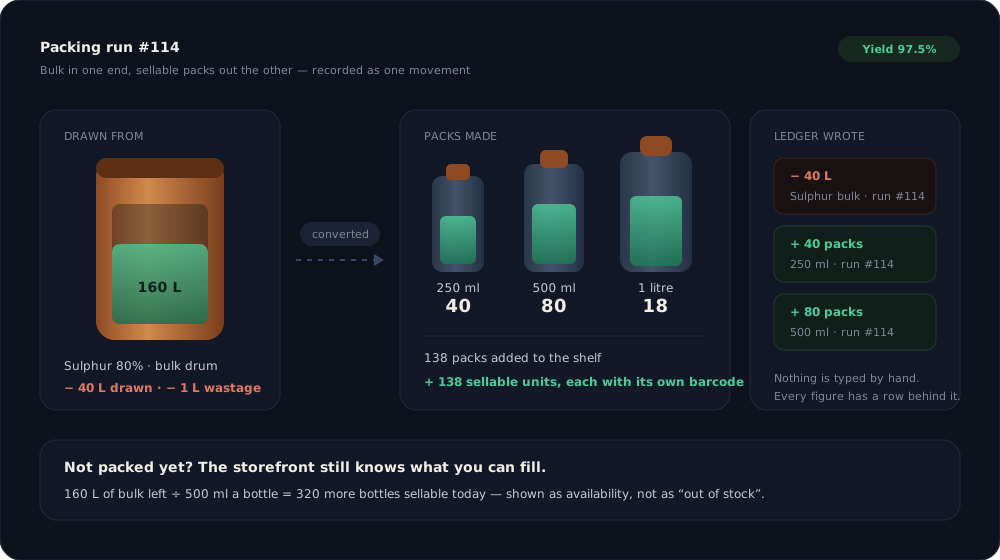
A dealer and a farmer are not charged the same, and never were
Type in the chain your office sheet already uses — costing profit, then packing cost, then the margin for each kind of buyer — and every product in the shop is priced by it. A signed-in customer sees the price that belongs to them, worked out on our server where their browser cannot ask for a better one.
- Distribution, direct sale, special, net and invoice prices from one purchase cost
- Change the policy once and the whole price list follows
- The website names the price it is showing, so a quote is never a mystery
- Load the bulk rate working sheet from Excel and fill a catalogue in minutes
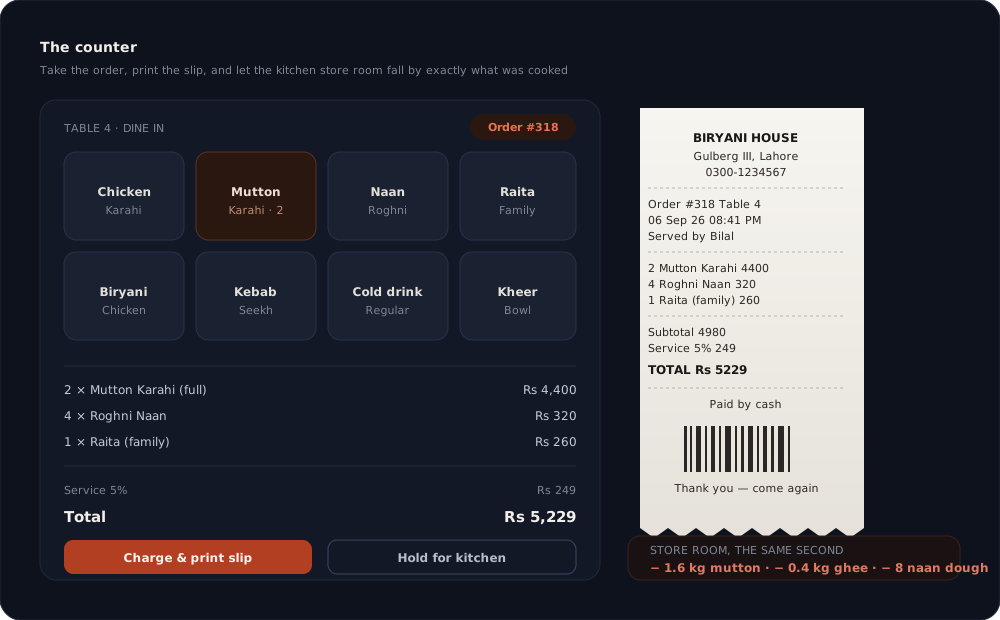
Sell a plate, and the chicken leaves the store room
The counter charges the order, prints the receipt, and tells the store room what it cost in ingredients — from the same recipe that priced the dish, so the two can never disagree. It is not only a kitchen thing: a shop whose recipe is one bag plus 50 kg of urea gets the same arithmetic.
- Receipts print over Bluetooth from a phone, or by cable from the till PC
- Table, server and time on every receipt, and a barcode for the order
- A cancelled sale is marked with a reason, never quietly removed
- Counter orders and website orders land in the same list
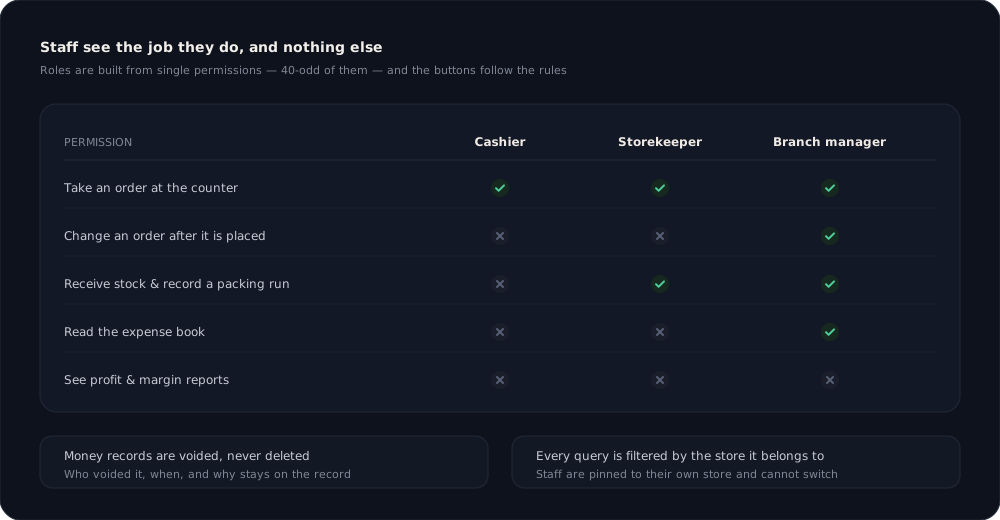
Everyone sees the job they do
You build a job out of single permissions, so a cashier who takes orders is not thereby somebody who can change one afterwards, and a storekeeper who signs for deliveries does not get the expense book. The buttons follow the same rules the server does — nothing is merely hidden from view.
- Over forty permissions, grouped by what they touch
- An exception for the one person who is an exception
- Staff are tied to their own shop and cannot switch to another
- Every question the server answers is filtered by the shop it belongs to
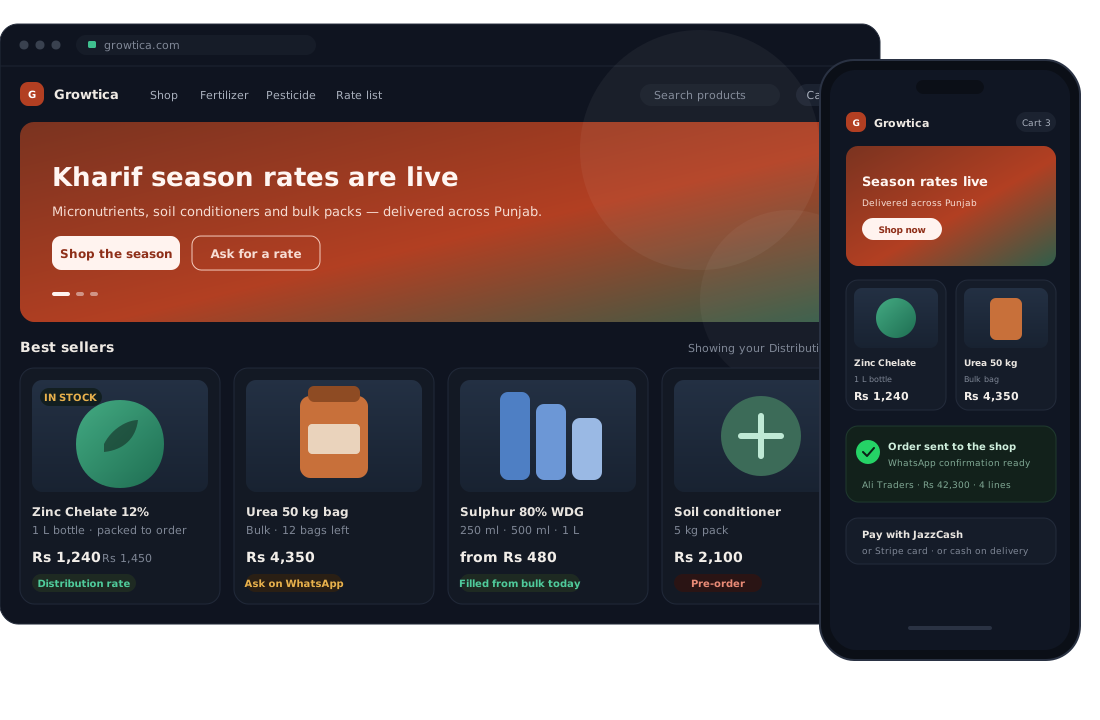
A website customers take for your own
Because it is. Point your web address at it and there is no platform name in sight — your logo in the corner, your banner, your categories, your prices. And it works on a phone, which is how most of your customers will actually open it.
- Banner layouts, tints and heights you pick without touching code
- A WhatsApp button under a product, for buyers who expect to haggle
- Decide whether an empty shelf refuses the order or takes it anyway
- Orders can announce themselves on WhatsApp the moment they are placed
What changes in the first week
Every one of these started as something a real shop was doing by hand. The point of the software is that the second line is true without anybody having to remember to make it true.
Today
Three people hold three different stock figures, and none of them is right.
With Multistores
One list of movements. The balance is their sum, and you can read it back line by line.
Today
The website says “out of stock” while two hundred litres sit in the yard.
With Multistores
Availability counts what the bulk can still fill, so the shop stays open for business.
Today
Dealers, shops and farmers are all charged whatever the website happens to say.
With Multistores
Each buyer gets their own price, decided on the server and named on the page.
Today
A plate is sold and the ingredients stay on the books until the fridge is empty.
With Multistores
The recipe takes the ingredients out as the order is charged, to the gram.
Today
The cashier can open the expense book, because the login is “the shop’s login”.
With Multistores
Each job carries only what it needs, and the screen shows only what the job allows.
Today
A second business means a second system, a second bill and a second habit.
With Multistores
Another shop in the same back office — sealed off from the first, one login for both.
Today
Nobody knows what to buy until something has already run out.
With Multistores
One screen every morning: what is short, worst first, packs and bulk together.
Today
Profit is worked out at the end of the month, on paper, by one person.
With Multistores
Takings, cost, margin and profit are on the dashboard while the day is still running.
One business, one monthly fee. It grows with your team, not with your sales.
You are never charged on what you sell or how many customers you keep. The fee goes up only with how many of your own people log in. The setup is charged once — we load the product or rate sheet you already keep, set your price bands up and get you open — and after that it is the monthly fee and nothing else. Try all of it free for 14 days first.
Starter
One business with a small team — the owner and a few people at the counter.
plus PKR 15,000 once, to set you up
Up to 5 staff logins
- As many dealers and customers as you like
- Every feature above — website, counter, stock, prices, profit
- Support over WhatsApp
Business
Most chosenA full team across the counter, the store room and the office.
plus PKR 25,000 once, to set you up
Up to 15 staff logins
- Everything in Starter
- A separate job, with its own permissions, for each of them
- Priority support over WhatsApp
Unlimited
A large operation, or staff who come and go through the season.
plus PKR 40,000 once, to set you up
As many staff logins as you need
- Everything in Business
- A named person who knows your setup
In every plan
One business, with its own web address and its own books
The website, the counter and the back office
As many products, categories, dealers and customers as you like
All four trades, and every feature listed above
New features as they ship, at no extra cost
Support over WhatsApp, from the people who built it
Own a second business as well? That is a second subscription, with its own web address and its own books — tell us and we will price the pair together.
Not sure which one you are? Tell us what you run on WhatsApp — 0309 6313133 — and we will say which plan fits.
Four steps to a shop that is open
You do not do these alone. Send us the sheet you already keep and we walk through the first three with you.
Create the shop
Name, web address and trade. It exists on its own web address from that moment, with its own catalogue and its own books.
Load what you sell
Upload the sheet you already keep — products, or the bulk rate working — and check the preview row by row before anything is saved.
Set prices and staff
Type the price chain once, put each customer on a band, and build the jobs your people actually do.
Open for business
Point your web address at the shop, switch on the ways you take money, and sell from the website and the counter on the same stock.
Where this goes next
The first column is what you can use today. The other two are the order we are working in, not dates we are promising — they move when a shop tells us something matters more.
Working today
In the product now- Every stock movement written down behind every balance
- Bottling jobs, and selling what the bulk can fill
- Customer price bands and the price-list import
- Recipes that use up ingredients when something sells
- Barcodes, and label sheets you can print
- Shortage warnings across packs and bulk
- Splitting an order so part of it can go out now
- A WhatsApp price enquiry from a product page
Being built
Worked on right now- Moving stock between branches of the same business
- Customer accounts, with repeat ordering and past orders
- Delivery and rider tracking on the order
- An export for whatever books your accountant keeps
Being considered
Wanted, not yet started- An Urdu screen for counter staff
- A counter that keeps working when the internet does not
- A WhatsApp catalogue kept in step with the website
- A warning when a supplier changes their price
- An app for dealers who reorder every week
The ones shops ask first
What does it cost?
A monthly fee for your business, plus one charge at the start to set you up — the plans are above. The fee goes up only with how many of your own staff log in; it is never a cut of your sales, and there is no limit on products, dealers or customers on any plan. Before any of it starts you get 14 days free, so you see it running on your own stock before you pay anything.
I have never used anything like this. Is it a website, a till, or an accounts package?
All three, and that is the point of it. Most shops end up with a website from one company, a till from another and a notebook for the money, and then somebody spends every evening making the three agree. Here they are one thing, so there is nothing to reconcile.
Do I have to be good with computers?
You need to be able to use a phone. The counter is a touch screen with big buttons, and the back office is a list of screens with one job each. We load your first catalogue for you and walk you through the rest, so nobody starts from a blank page.
Do I need a separate system for each of my businesses?
No. Each business is a shop inside the same back office, with its own catalogue, staff, stock and books. You switch between them from one login, and nothing crosses over.
Can one shop’s staff see another shop’s figures?
No. Staff are tied to the business they belong to and cannot select another, and every question the server answers is filtered by the shop it came from. Only an owner with several businesses can move between them.
Can I use my own web address?
Yes. Point your domain at us and the website answers on it, with your address in the bar the whole time. Every shop also gets a free address on ours, so you can be selling before the domain is sorted out.
What if I do not keep packed stock at all?
Then the website should not be refusing orders. Tell it what a pack is filled from and it will sell whatever the bulk can still fill — and if you only buy once the order comes in, you can switch the refusal off entirely and take the order anyway.
How can customers pay?
Stripe for cards, JazzCash for local wallets, a WhatsApp confirmation, and plain cash on delivery. You switch on the ones you take, shop by shop.
Does the counter work on a phone?
Yes — the counter is a normal screen, and receipts print over Bluetooth from the phone itself. Printing by cable needs our software running on the till PC, which is the usual setup for a fixed counter anyway.
Can I bring the price list I already have?
Yes. Upload the Excel sheet you keep now. Every row is shown as it will land — new, updated, or rejected with the reason — before a single one is saved, and one bad line never sinks the sheet.
What happens when a sale is rung up wrong?
It is cancelled, with who did it and why kept on the record. Money records are never quietly deleted, because a book you can silently edit is not a book.
Bring your first shop over this week
Send us the price list or product sheet you already keep. We will load it, set your prices up, and show you the shop running on your own stock — free for the first 14 days, before you decide anything.
WhatsApp or call 0309 6313133
Already running? Every shop keeps its own web address, its own staff and its own books.